Welcome to MHA Developers

YUUGA

Ecommerce storefront and operations platform

A complete ecommerce customer journey, not just a storefront.

Yuuga was built as a complete ecommerce customer journey. Customers can browse collections, view products, add items to their bag, save favourites, track orders, request returns and contact support from one branded experience.

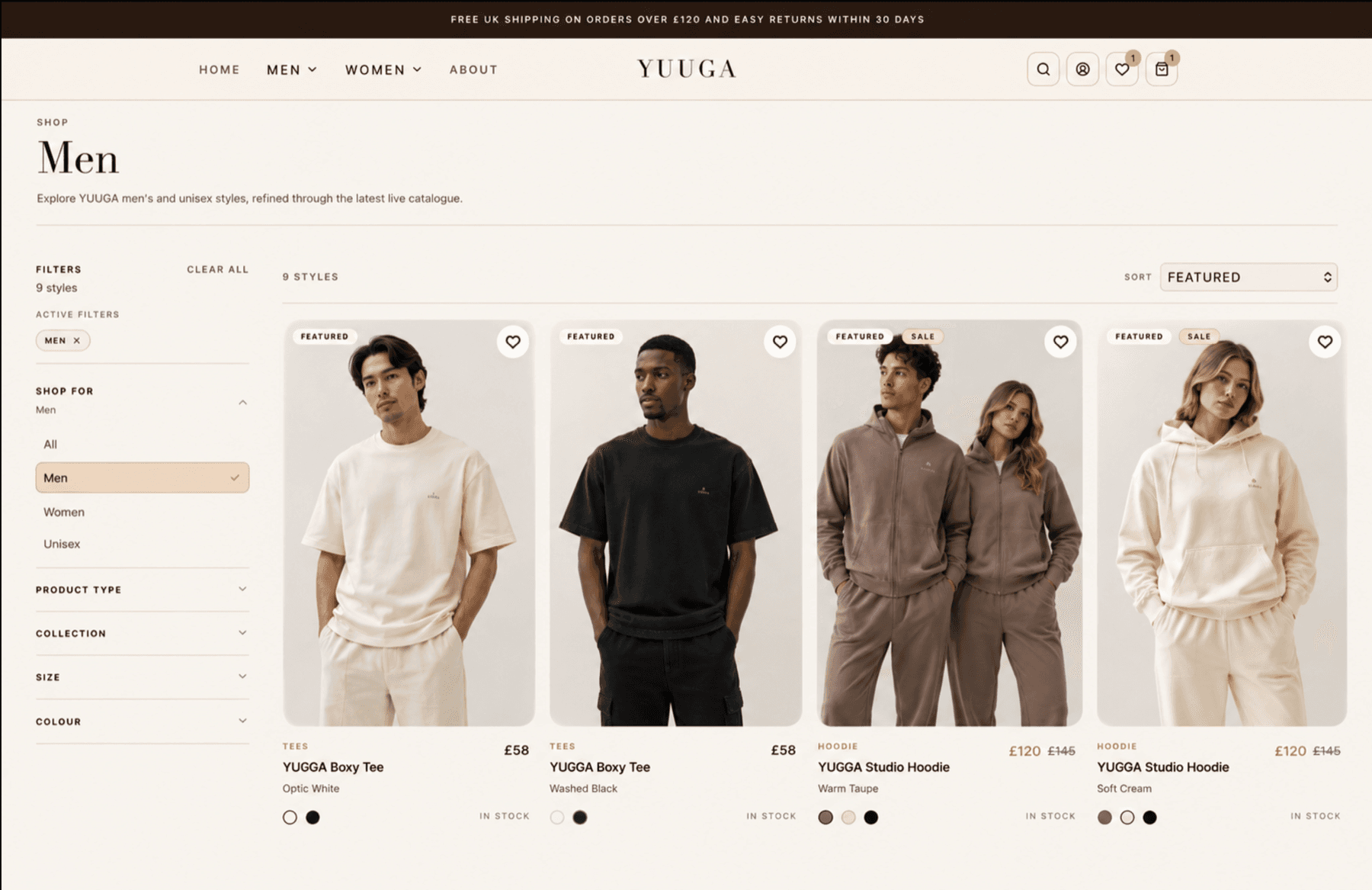
Yuuga product listing page with filters, product cards, sale badges and wishlist actions
Category listing page with filtering, sorting, product cards, sale badges, colour options and wishlist actions.

Project overview

A customer-facing ecommerce experience backed by account tools, support flows and operational self-service.

Yuuga's frontend was designed as a premium ecommerce experience for a fashion brand, combining product discovery, product detail pages, customer accounts, returns, wishlist, cart and live support into one connected customer journey.

Rather than building a basic online shop, the storefront gives customers a smoother way to browse, buy, track orders, request returns and contact support without needing to chase the business manually.

Client

Yuuga

Project type

Ecommerce storefront and operations platform

Focus

Customer journey before and after checkout

Showcase

Public ecommerce case study

Frontend customer experience

Built around the full journey before and after checkout.

Yuuga was built to support the full customer journey before and after checkout. The frontend gives shoppers clear product discovery, a focused product page, quick cart access, account tools, returns support and customer care routes.

  • Browse collections and filter products
  • View detailed product pages with variants
  • Add items to a slide-out bag
  • Save favourites for later
  • Track orders from the customer account
  • Request returns linked to real orders
  • Contact support from the shopping experience
Yuuga product listing page with filters, product cards, sale badges and wishlist actions
Category listing page with filtering, sorting, product cards, sale badges, colour options and wishlist actions.

Product discovery

Product discovery that scales with the catalogue

Yuuga's shop listing gives customers a structured way to browse products by category, product type, collection, size and colour. Product cards show key buying information such as pricing, sale status, available colours, stock state and wishlist actions.

  • Improves product discovery
  • Helps customers narrow down choices
  • Supports sale and featured product promotion
  • Makes product availability clearer
  • Encourages wishlist engagement
  • Creates a scalable catalogue structure

Responsive experience

Built for desktop and mobile shopping

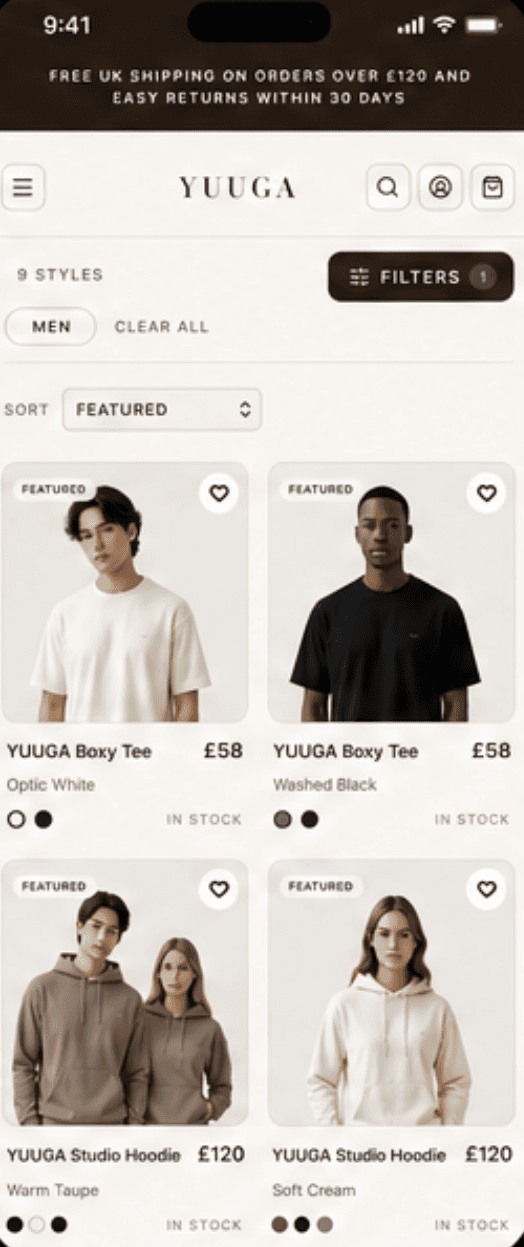
Yuuga delivers a seamless shopping experience across all devices. The same premium browsing, product details and bag functionality work clearly on mobile, so customers can shop anytime, anywhere.

  • Fully responsive design
  • Optimised mobile product browsing
  • Smooth bag and checkout flow
  • Touch-friendly filters and navigation
  • Consistent brand experience
  • Built for high performance on all devices
Yuuga desktop category listing showing filters and product cards
Yuuga mobile product listing showing filters, product cards and shopping controls

One experience. Every device.

Designed to convert on desktop. Optimised for mobile.

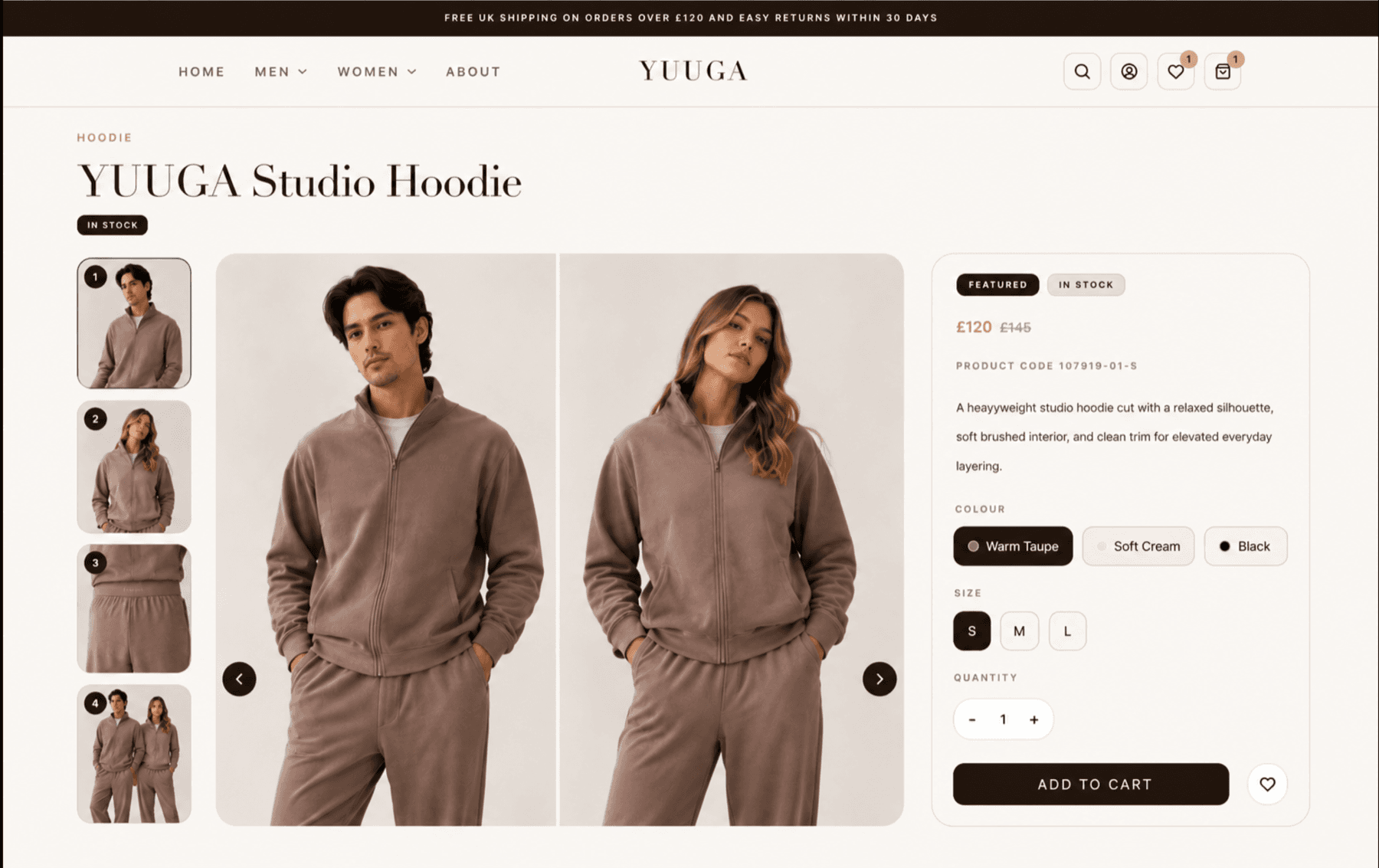
Yuuga product detail page with product gallery, variants, quantity selector and add to cart action
Product detail page with gallery, colour and size selection, quantity control, wishlist and add-to-cart flow.

Product detail

Focused product pages built for conversion

The product detail page was designed to keep the purchase journey clear. Customers can view product imagery, select colour and size, adjust quantity, add to cart and save items to their wishlist from one focused product screen.

  • Makes products easier to understand
  • Keeps purchase actions clear
  • Supports variants such as colour and size
  • Encourages wishlist saves
  • Creates a more premium shopping experience
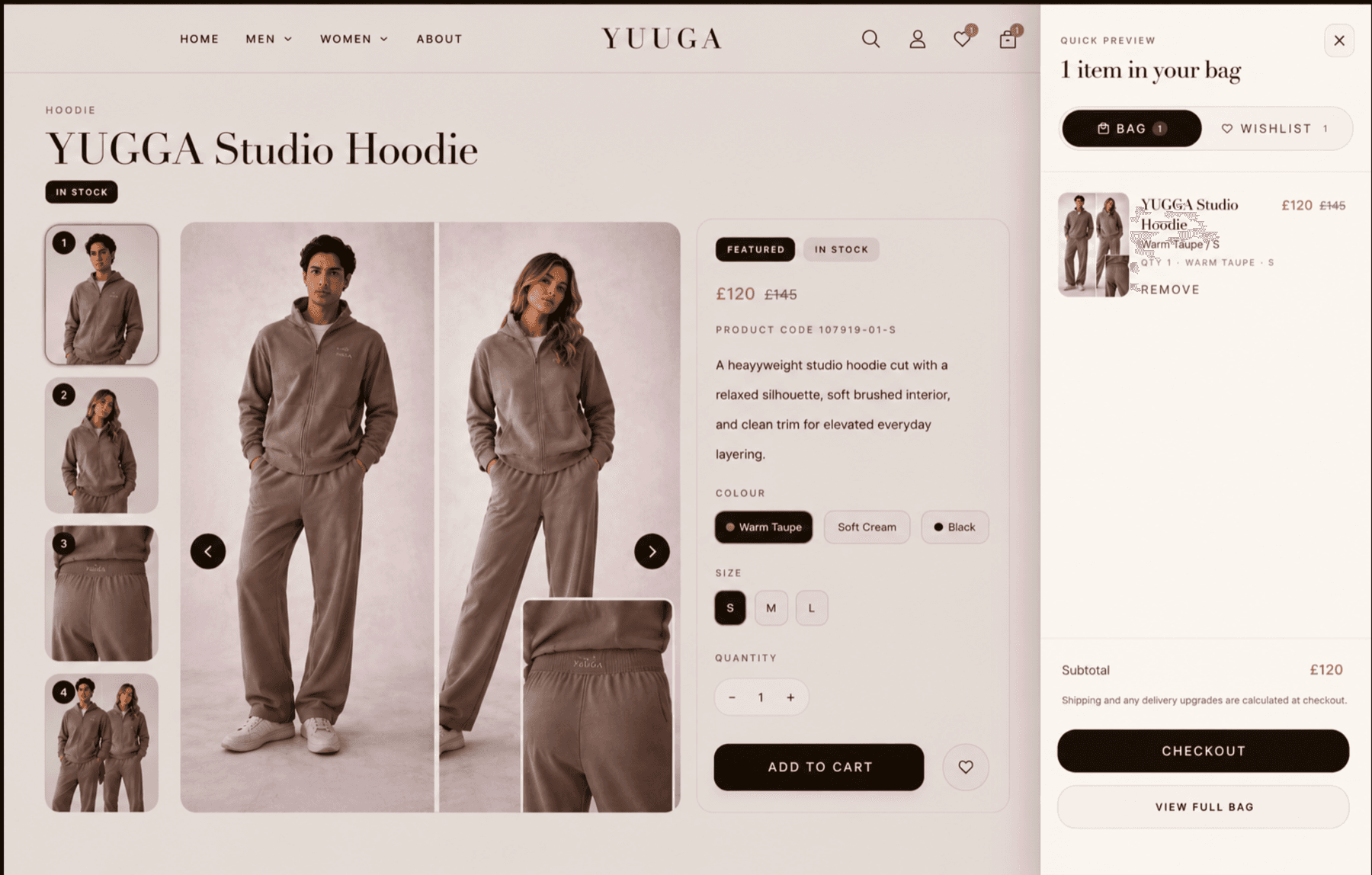
Yuuga slide-out shopping bag preview with product, price, subtotal and checkout action
Slide-out shopping bag preview allowing customers to review items and continue to checkout without leaving the product page.

Cart drawer

A smoother cart experience without leaving the product page

Yuuga's cart drawer lets customers review their bag without leaving the product page. They can check selected products, sizing, pricing and quantities before moving to checkout, helping keep the buying journey smooth and uninterrupted.

  • Keeps the checkout route close to the product journey
  • Keeps customers on the product page
  • Makes the cart easier to access
  • Supports quicker purchasing decisions
  • Improves the perceived quality of the shopping experience
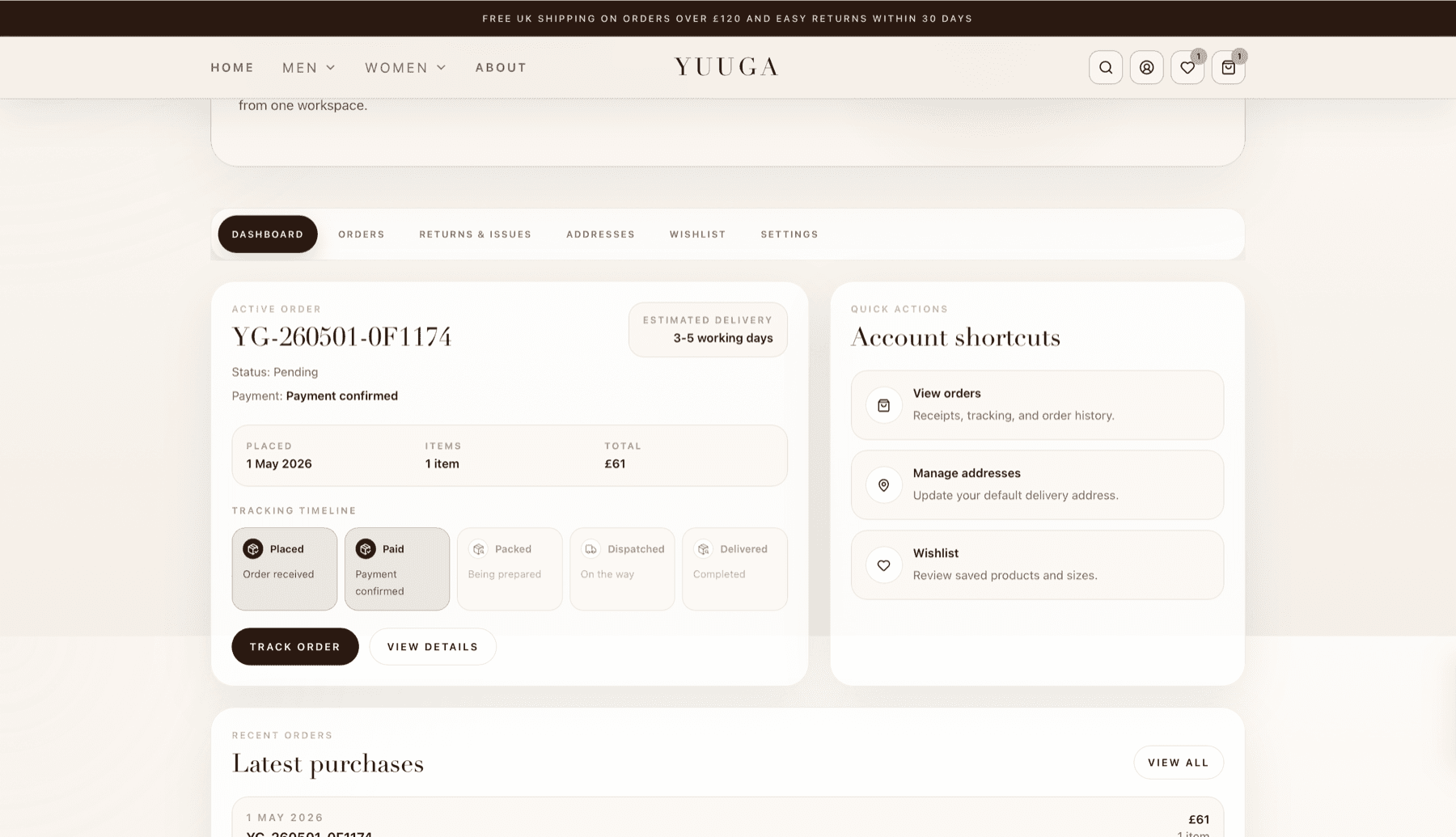
Yuuga customer dashboard showing active order, payment confirmation, delivery estimate and tracking timeline
Customer dashboard showing active order status, payment confirmation, delivery estimate and tracking timeline.

Customer account

Customer accounts with order visibility

The customer account gives shoppers a clear place to view active orders, payment status, estimated delivery, tracking progress and account shortcuts. This gives customers a self-service route for basic order updates before they need to contact the business.

  • Gives customers order visibility
  • Gives customers a place to check order progress
  • Improves trust after checkout
  • Keeps account tools in one place
  • Supports repeat purchases through order history and wishlist shortcuts
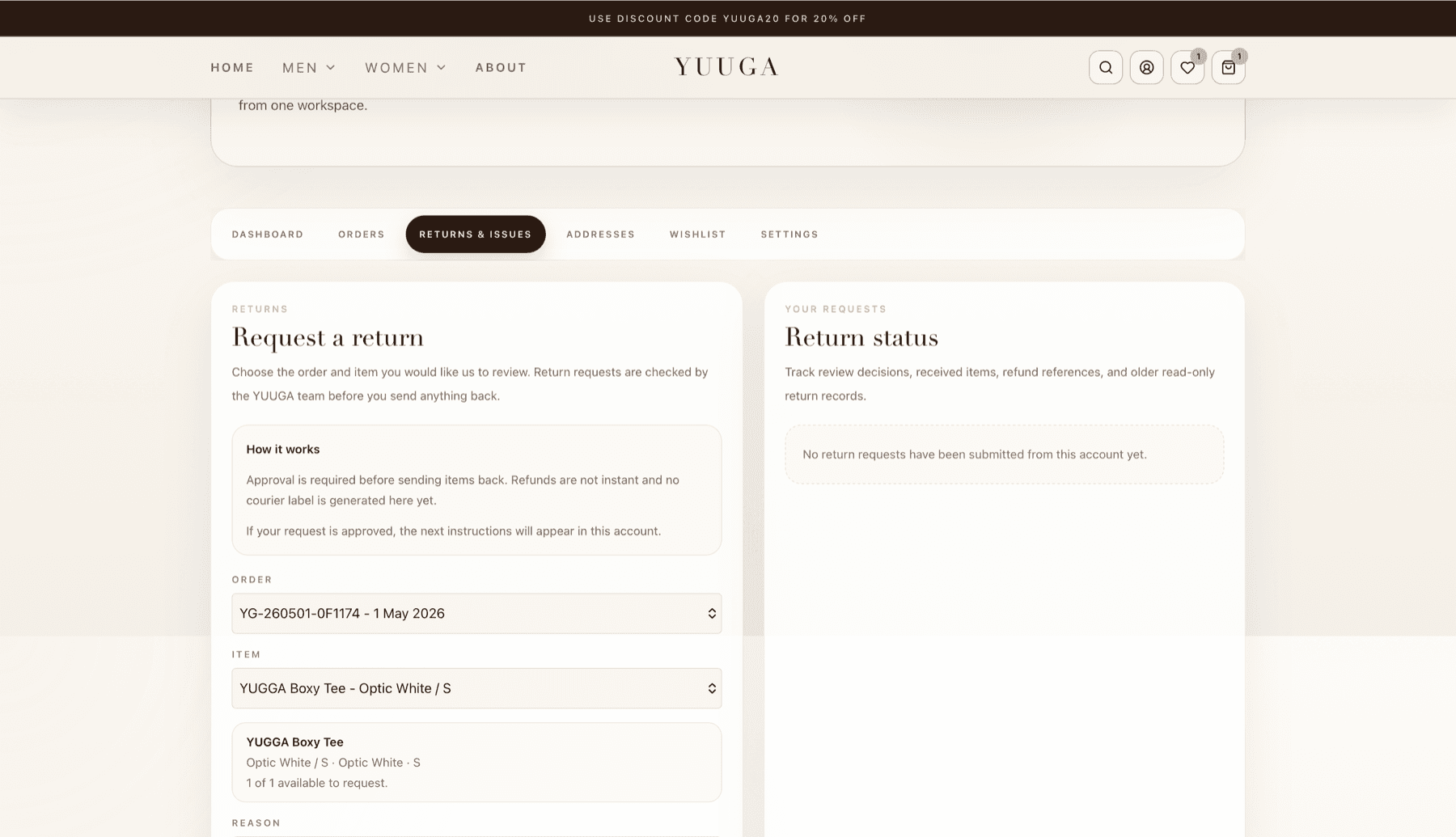
Yuuga returns request flow linked to an account order and product item
Customer account return flow allowing customers to request and track return decisions.

Returns support

Controlled return requests linked to real orders

Customers can request returns from inside their account by selecting the order and item they want reviewed. The system explains the process clearly and gives the business a controlled way to review return requests before customers send items back.

  • Makes return conversations more structured
  • Keeps return requests linked to real orders
  • Gives the business control before items are sent back
  • Makes the customer experience feel more professional
  • Creates a foundation for future refund and return automation
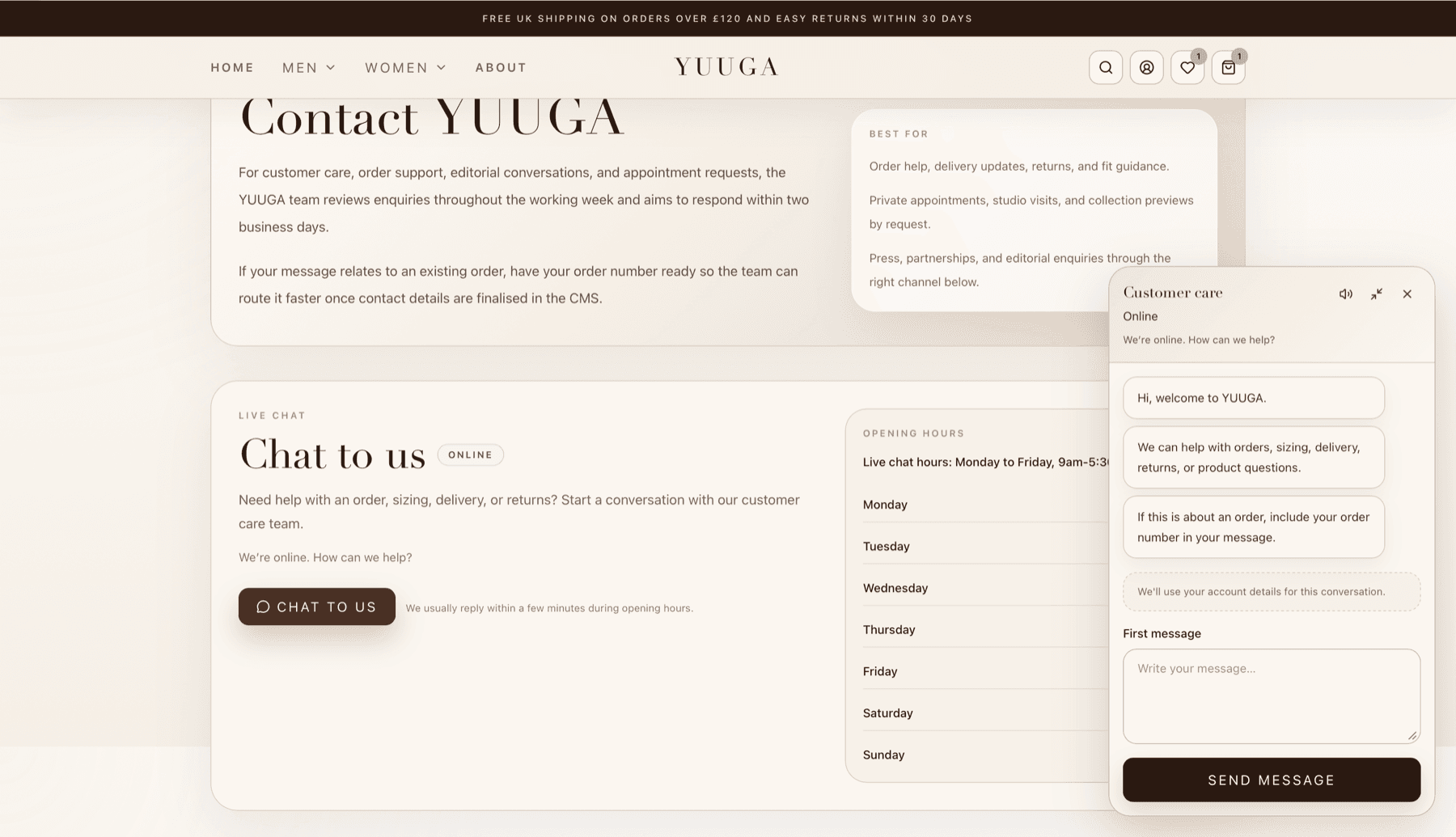
Yuuga customer support page with live chat, opening hours and guided enquiry handling
Customer support page with live chat, opening hours and guided enquiry handling.

Customer support

Customer support built into the shopping experience

Yuuga includes a structured customer support area with live chat, opening hours and clear guidance for order-related enquiries. Customers can quickly understand the best way to get help, while the business can collect better information from the first message.

  • Improves customer trust
  • Makes support easier to access
  • Guides customers toward clearer first messages
  • Helps route order, return and sizing questions more clearly
  • Creates a more professional post-purchase experience

Backend operations CMS

The tools behind the storefront.

Yuuga's backend was built to give the business more control over day-to-day ecommerce operations. The CMS brings together content editing, order workflows, fulfilment queues, customer conversations, complaints, email campaigns and performance reporting in one internal workspace.

This means the business is not just managing a website. It is managing the customer journey and operational workflow behind the website.

Operational flow

  1. 1Product and content data is managed behind the scenes
  2. 2Storefront pages use that data for listings and product detail pages
  3. 3Customers buy, save, track, request returns and contact support
  4. 4The business receives structured order, account, return and support context
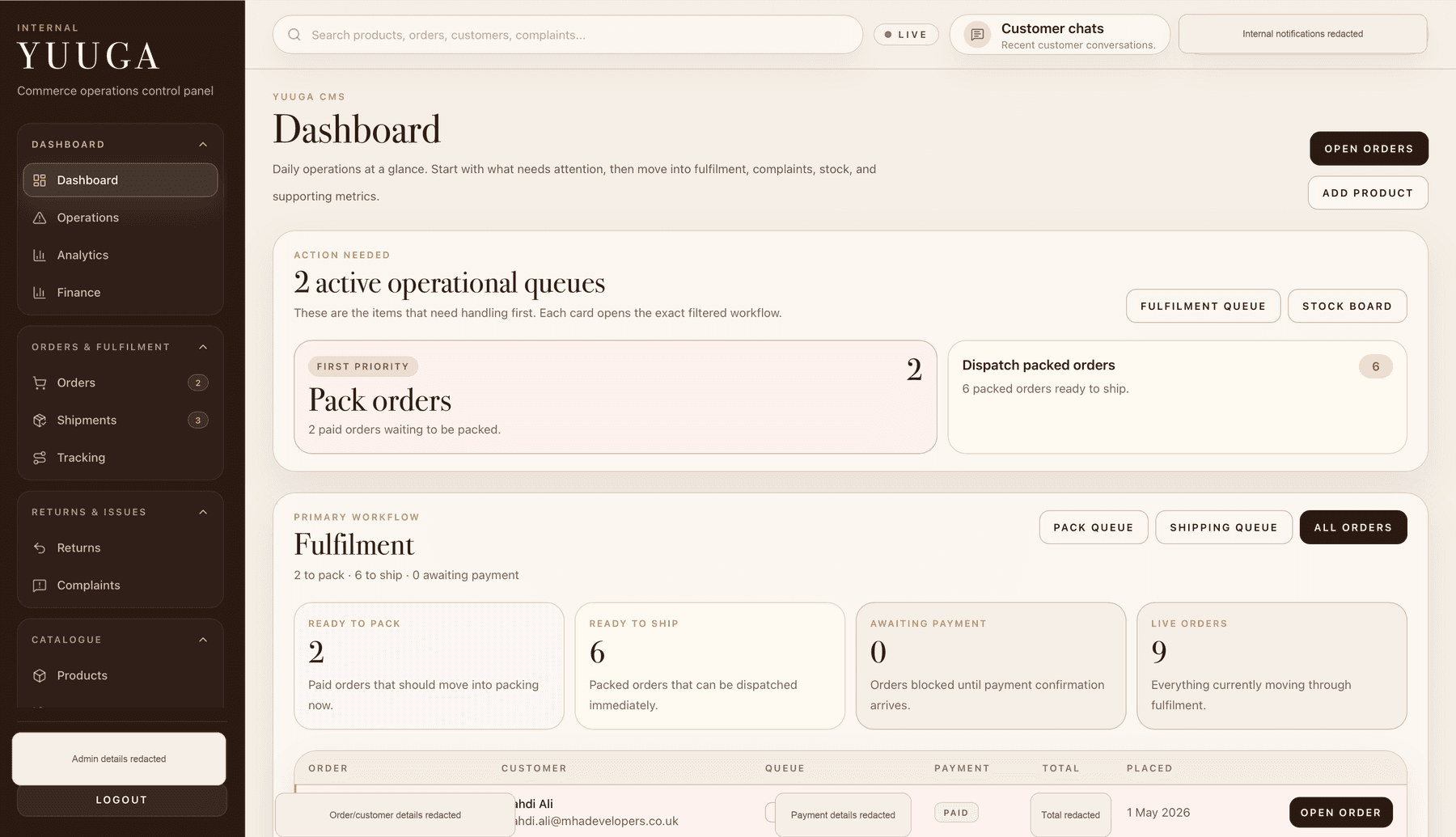
Redacted Yuuga CMS operations dashboard showing fulfilment queues and order workflow status
Operations dashboard showing fulfilment queues, action-needed cards and live order workflow status.

Operations dashboard

Daily operations at a glance

The operations dashboard highlights the tasks that need attention first, such as orders waiting to be packed, shipments ready to dispatch and live orders moving through fulfilment. This gives staff a practical starting point each day instead of forcing them to search through separate order screens.

  • Shows operational priorities at a glance
  • Highlights orders that need action
  • Separates packing, shipping and fulfilment queues
  • Helps staff move from dashboard to the correct workflow
  • Makes it easier to find what needs doing next
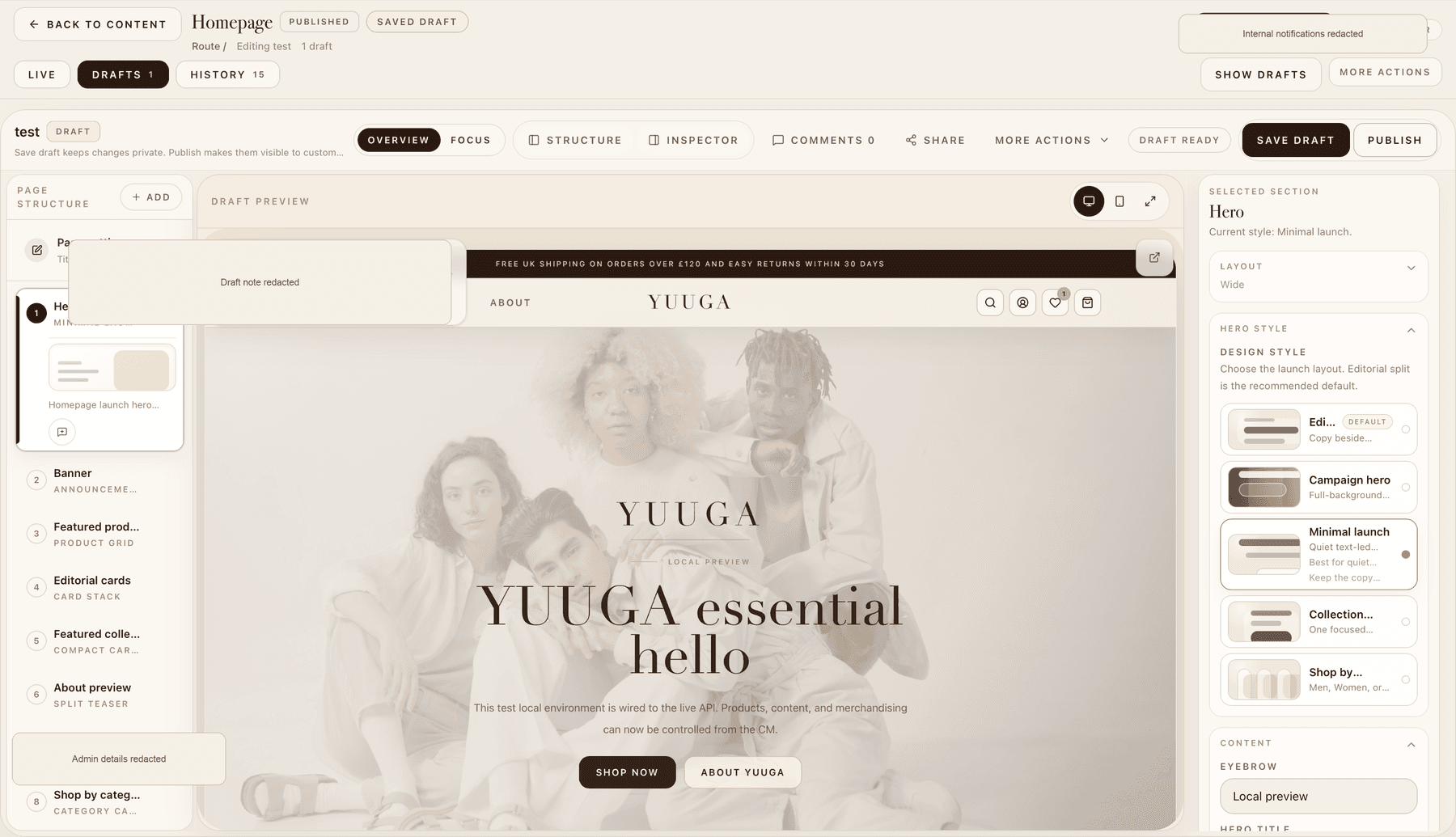
Redacted Yuuga CMS visual homepage editor with draft preview, section structure and publishing workflow
Visual homepage editor with draft preview, section structure, content controls and publishing workflow.

Website content editor

Visual content editing with draft control

Yuuga includes a visual website content editor that lets the team manage homepage sections, drafts, page structure and publishing from inside the CMS. Changes can be previewed before going live, so the storefront can be updated without needing a developer for every content change.

  • Lets the business update homepage content without code
  • Supports draft changes before publishing
  • Limits developer dependency for routine content updates
  • Keeps live content protected until changes are approved
  • Makes campaigns, banners and product sections easier to manage
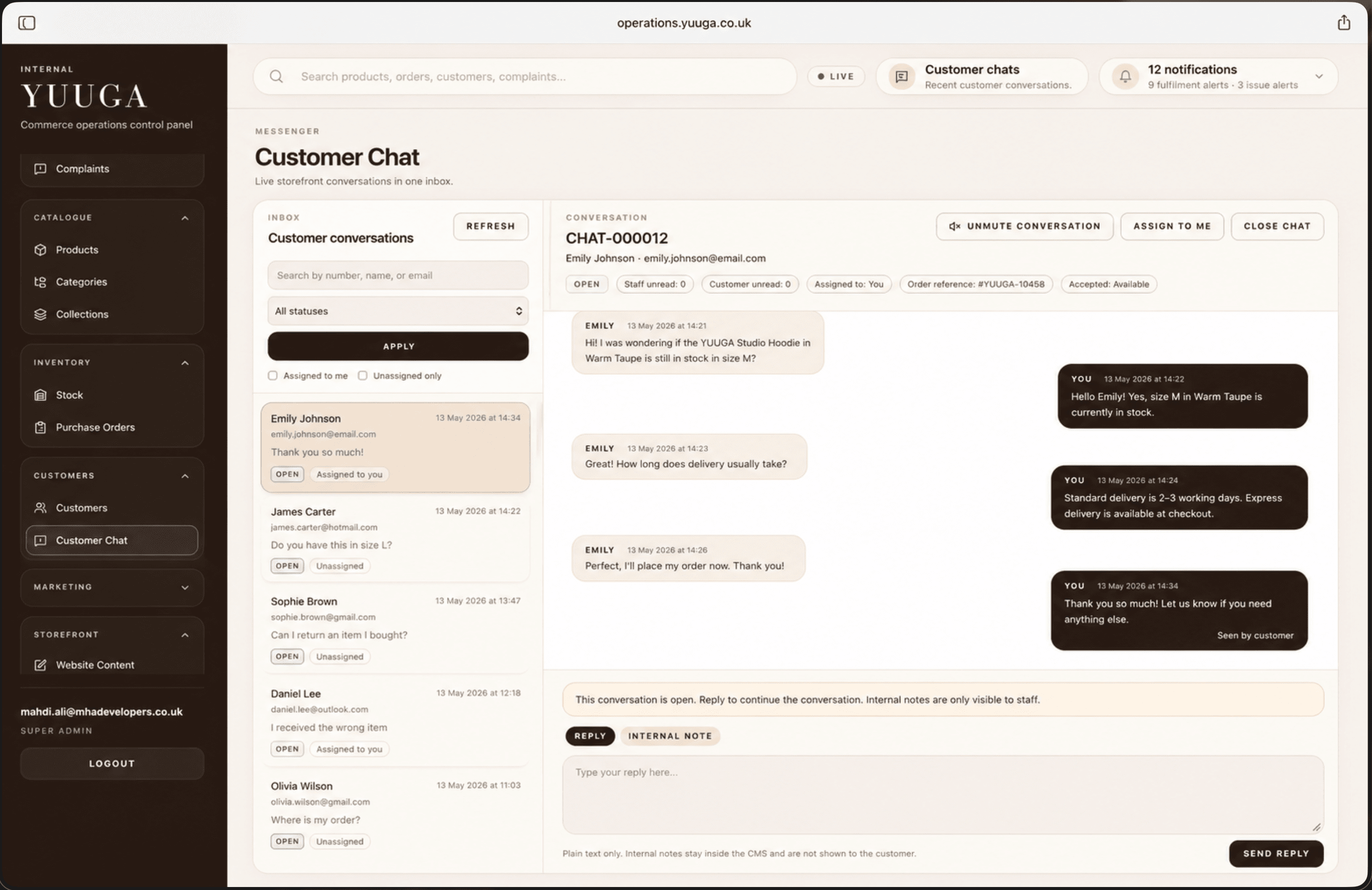
Redacted Yuuga CMS customer chat inbox with conversation list, assignment controls and internal notes area
Customer chat inbox for managing storefront conversations, assignments, replies and internal notes.

Customer chat inbox

Customer conversations managed inside the CMS

Customer messages from the storefront are managed inside the CMS through a dedicated chat inbox. Staff can view conversations, search customers, filter chats, assign conversations, reopen closed chats and add internal notes without exposing those notes to the customer.

  • Keeps customer conversations in one place
  • Helps staff manage open, closed and assigned chats
  • Supports internal notes for team communication
  • Makes support easier to track
  • Connects customer conversations to ecommerce operations
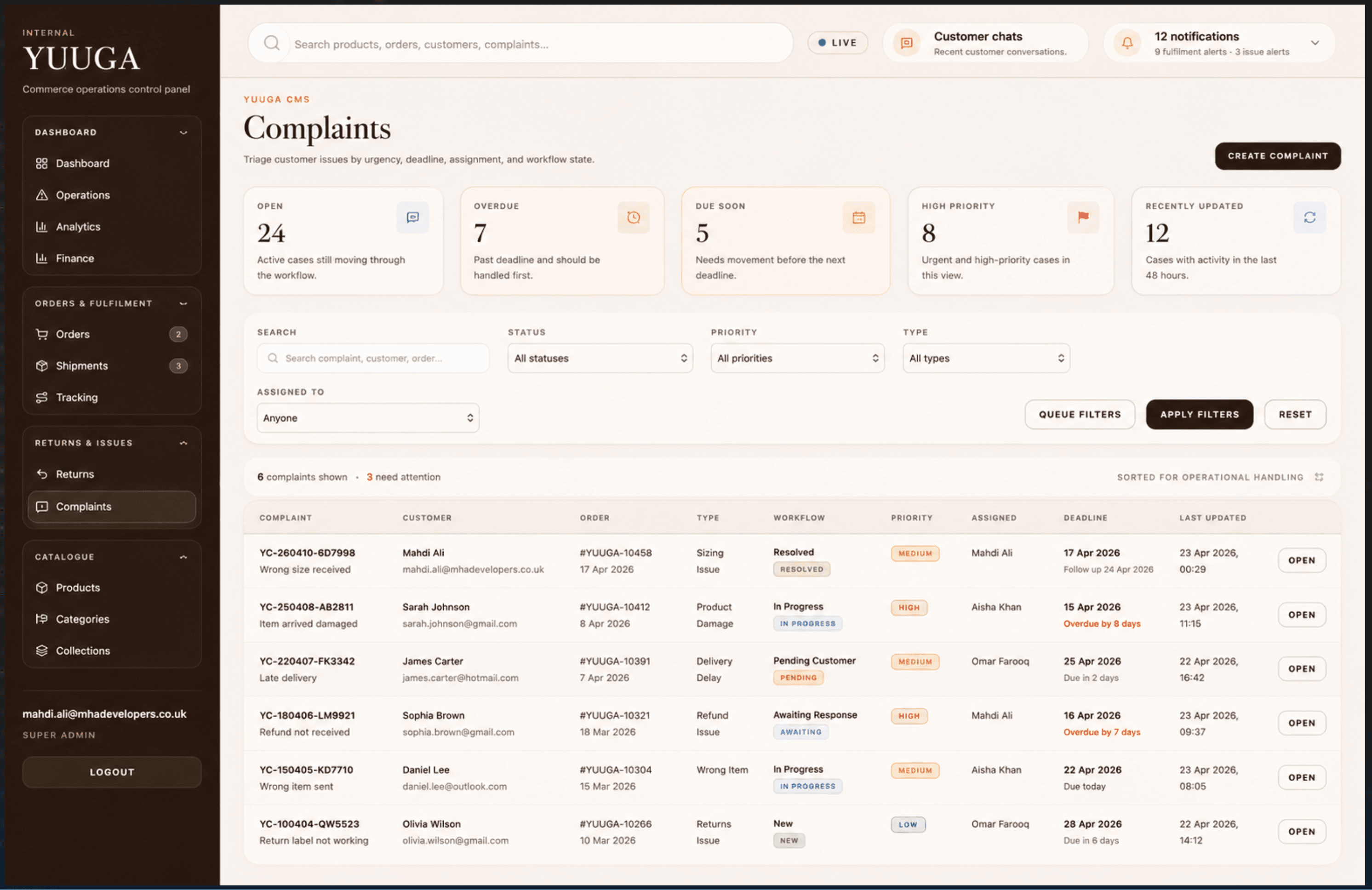
Redacted Yuuga CMS complaints dashboard with status cards, filtering, priorities and issue table
Complaints dashboard with status cards, filtering, priorities, deadlines and assigned issue tracking.

Complaints management

Structured complaints and issue tracking

Yuuga includes a complaints workflow for tracking customer issues by status, priority, type, assignment and deadline. This gives the team a clearer way to handle support cases that need follow-up, instead of relying on scattered messages or memory.

  • Centralises customer complaints and issues
  • Prioritises overdue, urgent and active cases
  • Lets staff filter by status, priority, type and assignment
  • Creates a clearer workflow for customer issue resolution
  • Makes complaints harder to miss
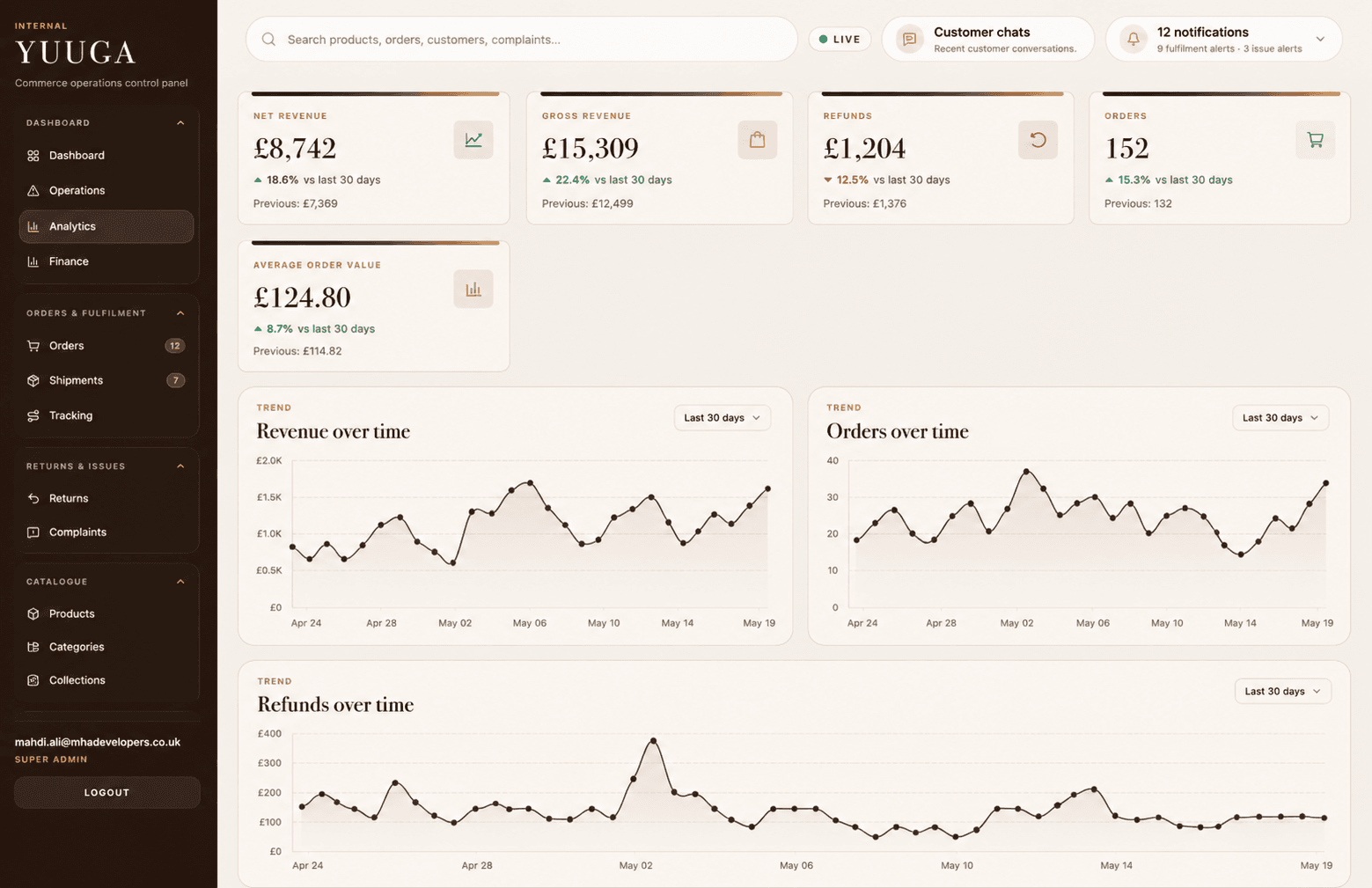
Redacted Yuuga CMS analytics dashboard showing ecommerce reporting cards and trend chart areas
Ecommerce analytics dashboard showing revenue, refunds, order volume, average order value and trend charts.

Analytics dashboard

Commerce reporting in one place

The analytics area gives the business visibility over key ecommerce performance figures such as revenue, refunds, order count and average order value. Trend charts help the team understand activity over time and spot patterns in orders and revenue.

  • Shows key ecommerce numbers in one place
  • Tracks revenue, refunds, orders and average order value
  • Gives the team a clearer picture of store performance
  • Supports better operational decisions
  • Helps identify trends over time
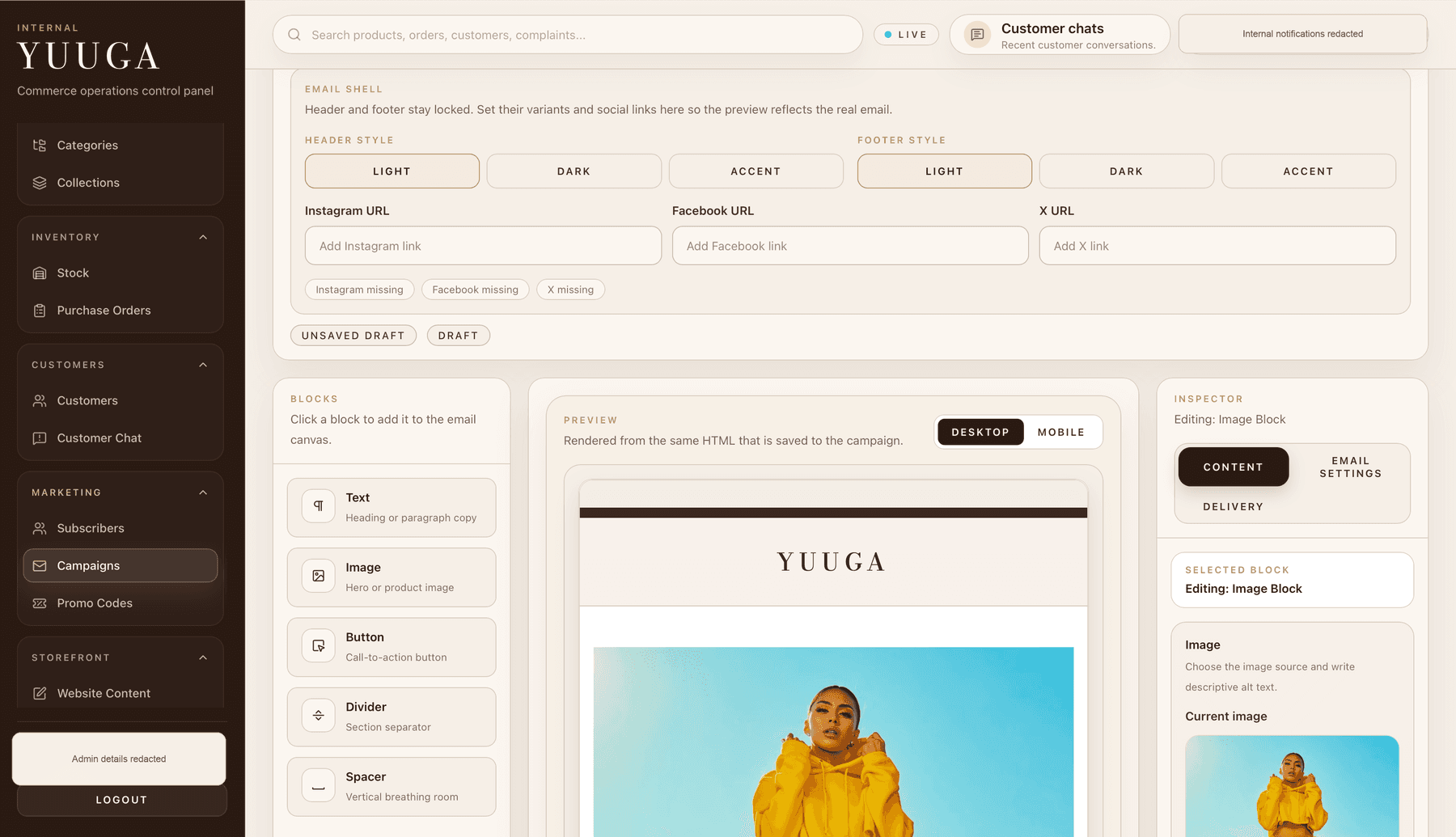
Redacted Yuuga CMS email campaign editor with reusable blocks, preview and inspector controls
Email campaign editor with reusable content blocks, live preview and inspector controls.

Email campaign editor

Branded email campaign editing

The CMS includes an email campaign editor where the team can build branded customer emails using content blocks, image sections, buttons and layout controls. The preview renders the same email structure customers receive, helping the business prepare campaigns without managing separate email templates manually.

  • Creates branded campaign emails from inside the CMS
  • Allows content blocks such as text, images, buttons and dividers
  • Keeps email styling consistent with the brand
  • Gives the team a preview before sending
  • Keeps campaign editing closer to the ecommerce workspace

Backend value summary

Operational control behind the ecommerce experience.

Yuuga shows how ecommerce can go beyond a public storefront. The backend gives the business tools to manage content, orders, fulfilment, customer conversations, complaints, campaigns and reporting from one workspace.

Discuss a Custom Ecommerce System
  • Content publishing and draft previews
  • Order and fulfilment queues
  • Customer chat inbox
  • Complaints and issue tracking
  • Email campaign editing
  • Ecommerce reporting and analytics

Customer journey built beyond checkout

Frontend value delivered.

This gives the brand more control over the customer journey while reducing the amount of manual admin usually created by order questions, return requests and support messages.

  • Product discovery and filtering
  • Product detail pages with variants and wishlist
  • Slide-out cart and smoother checkout journey
  • Customer dashboard with order visibility
  • Returns request flow linked to real orders
  • Live chat and customer support guidance
  • Catalogue, product and merchandising control
  • Operational workflows for orders, returns and support

Build something similar

Need an ecommerce experience like this?

Tell us what you need built and we will recommend the right website, ecommerce or custom system approach.